Setting Document-Level Instructions in Weave
Setting Document-Level Instructions in Weave
Document-level instructions in the Weave platform allow you to set broad guidelines, such as a style guide or naming conventions, that apply consistently across an entire document.
Key Writing Workflows for Document-Level Instructions
- Applying Style Guides: You can input a full style guide to ensure all generated or edited content adheres to specific stylistic rules.
- Enforcing Consistent Naming/Terminology: Specify how certain terms, such as a drug or product name, must be referred to. For example, you can instruct the system to "refer to X drug always by Y name" and list all acceptable variants to maintain consistent terminology.
- Ensure Consistency by Applying AI Instructions Broadly : Use this feature for instructions that are not targeted at a single section but apply as a broad, overall rule for the document's content. For example, this can be helpful when you want the AI to follow a consistent order when summarizing and listing studies or study results.
How to Set Document Instructions
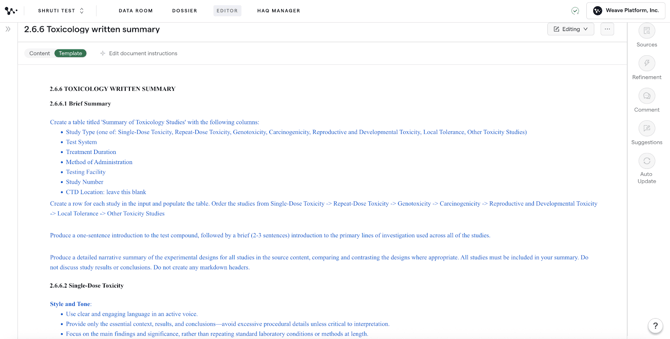
- Navigate to the Editor: Log into the Weave platform and open the document you wish to edit.
- Ensure Editing Mode: Make sure you are in the document's editing mode.
- Go to Template: Select the Template menu option.
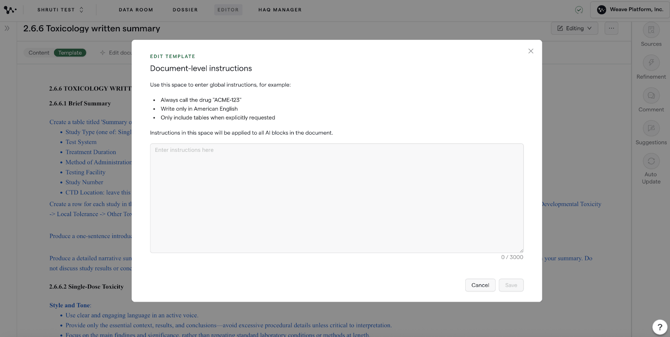
- Find the Setting: Look for and click on Edit Document Instructions on the left side of the screen.
- Enter Instructions: Use this setting to provide your instructions for the entire document, which are applied at the template level. You can use your own words for the instructions.